Handheld network tester for VoIP installers

Know the phones will work before you plug them in.

Voxkit is a pocket-sized tester that plugs into any socket on a customer's network and tells you, in plain English, whether hosted phones will work there: firewall, call quality, Wi-Fi, 4G and cabling. When you've finished, the customer report is already in your inbox.

18 tools, one key each Firewall check in about 30 seconds Reports emailed when you save
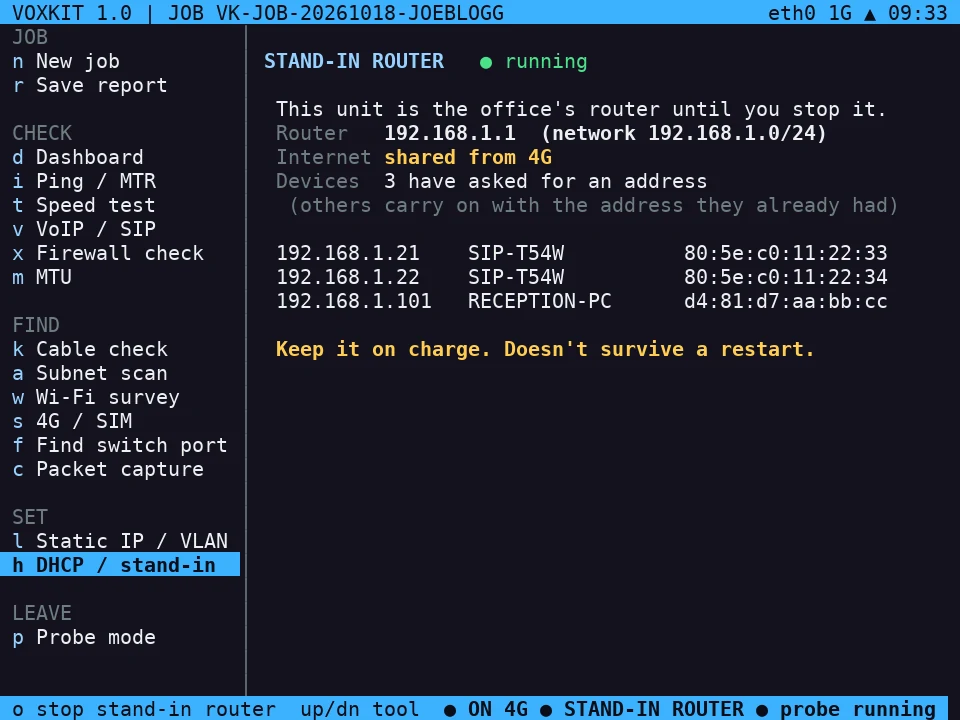
Voxkit dashboard: link 1000 Mb/s, switch core-sw1 port Gi1/0/7, voice VLAN 120, gateway and DNS healthy
Gi1/0/7 · VLAN 120
Why it exists

Built from the calls every installer dreads.

The phones were fine when you left.

One-way audio and dropped calls after go-live are almost always the customer's router or firewall. Voxkit finds SIP ALG, SSL inspection and blocked ports before the phones are unboxed.

We're still waiting on their IT.

Instead of sending a generic firewall guide and hoping, you send their IT team a request listing only what this site needs, with exact addresses and ports, written for you on the spot.

It's slow sometimes.

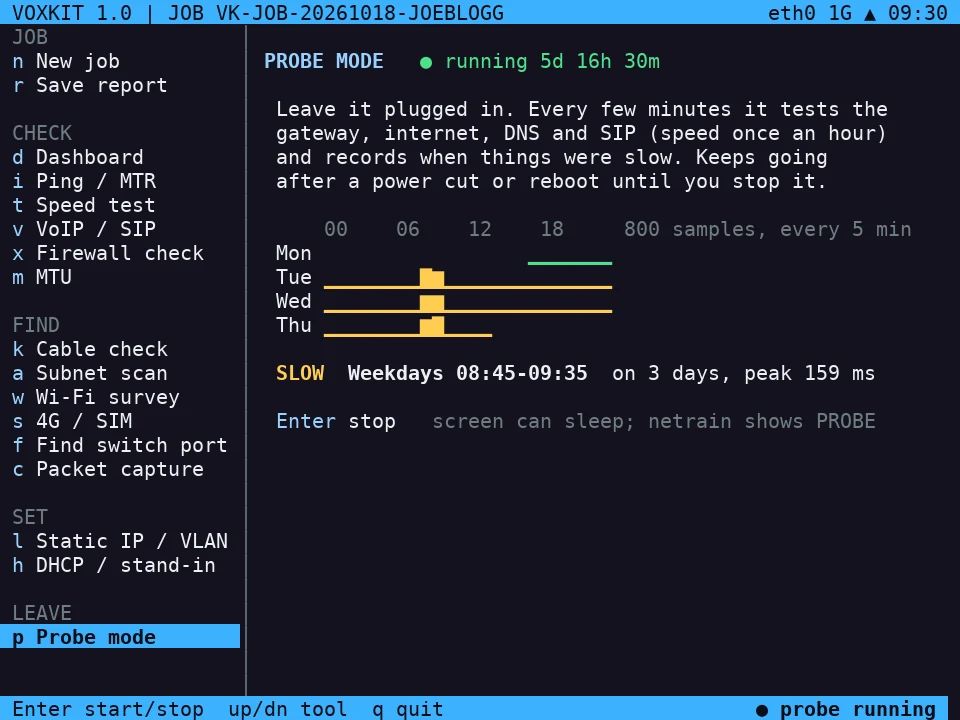
Leave Voxkit plugged in. Probe mode tests every five minutes for days, emails you when it goes wrong, and picks out patterns like "every weekday 08:45 to 09:35".

Which port is this socket?

Plug into the wall and Voxkit reads the switch name, port and VLAN. On a basic switch it blinks the port light so you can spot it in the cabinet.

Firewall check · key x

"Will phones work through this firewall?" Answered in 30 seconds.

Plug into a socket a phone will use and press one key. Voxkit runs every check in the platform's firewall guide and gives each one a pass, a fail or "needs confirming".

  • Name lookups for every platform address
  • Call setup (SIP) on UDP and TCP 5060 and TLS 5061
  • SIP ALG: whether the firewall is rewriting call setup messages
  • Phone setup servers, including SSL inspection by FortiGate, Sophos, WatchGuard and others
  • Yealink RPS and time servers, which phones need to connect securely
  • Outbound filtering, to judge whether call audio (UDP 10000–40000) needs a rule

A check that fails once is retried before it counts. A DNS hiccup is reported as a DNS hiccup, not a blocked firewall.
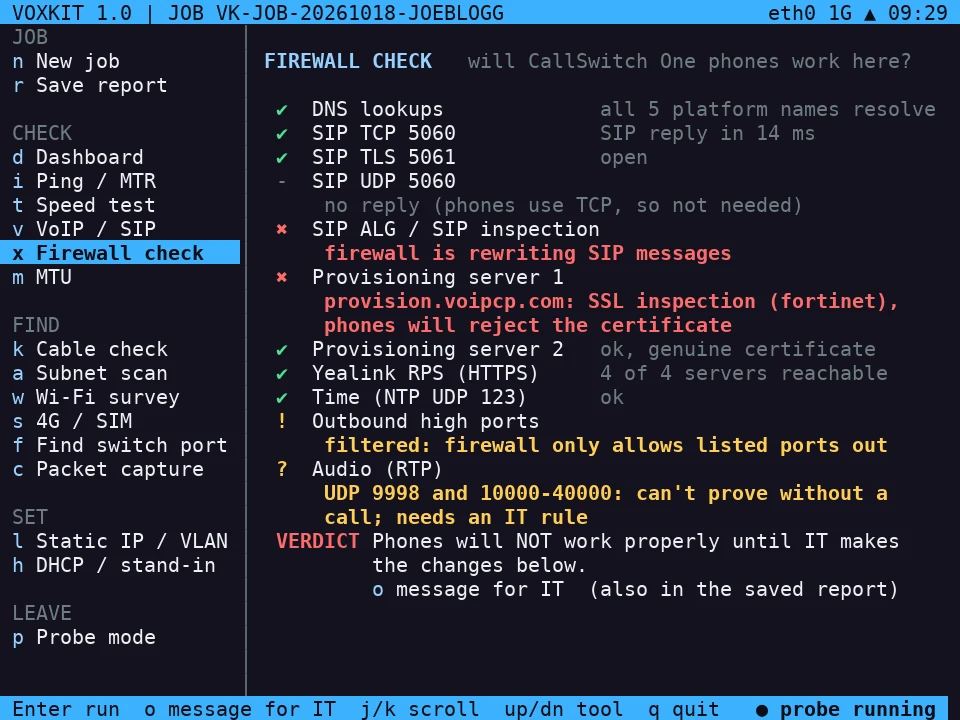
Firewall check results: SIP ALG detected and SSL inspection by a Fortinet firewall, outbound traffic filtered
Sample site: SIP inspection on, Fortinet SSL inspection breaking phone setup, outbound traffic filtered.
For the customer's IT team, ready to sendPhone system firewall changes for Joe Bloggs Ltd
We've tested the network and the firewall needs the following so the phones can register and calls have audio both ways:

1. Disable SIP ALG / SIP inspection.
2. Exclude provision.voipcp.com and firstprovision.voipcp.com from SSL/HTTPS inspection.
3. Allow outbound UDP 9998 and 10000-40000 (call audio) to 35.246.34.97, 34.147.198.83, 35.246.28.102, 34.147.171.124.
Everything on one menu

18 tools. One key each.

Every tool has a single-letter shortcut, so an engineer goes from plugging in to an answer in a couple of key presses. Every result is saved to the job automatically.

Job

Start, finish, hand over.

1
Site survey

One button for sales visits: checks the internet, speed, Wi-Fi and the kit on site, then saves and emails one report.

n
New job

Customer, site code and job reference, typed once. Everything after is filed under one report number.

r
Save report

Writes the job file and emails it to you the moment the unit is online. QR code and USB stick as backups.

Check

Is the connection good enough?

d
Dashboard

Link speed, switch and port, VLANs, address, gateway, DNS, public IP, Wi-Fi and live health lights on one screen.

i
Ping and route trace

Every hop to the destination with delay and loss, and a plain-English note on whether a silent hop matters.

t
Speed test

Download, upload, delay, jitter and loss, plus delay while the line is busy, which is what really breaks calls.

v
VoIP check and test call

Talks to the phone platform like a desk phone does: reachability, SIP ALG, NAT, voice VLAN. Then a real two-way test call with loss, jitter and MOS each way.

x
Firewall check

The platform's firewall guide, run automatically, with the request for IT written for you.

m
MTU check

Finds the largest packet the line carries, for slow VPNs and half-loading websites.

Find

What's on the network, and where.

k
Cable check

60 seconds of traffic through the run, watching for errors, drops and 100 Mb/s links. Wiggle mode flashes the moment a lead drops.

a
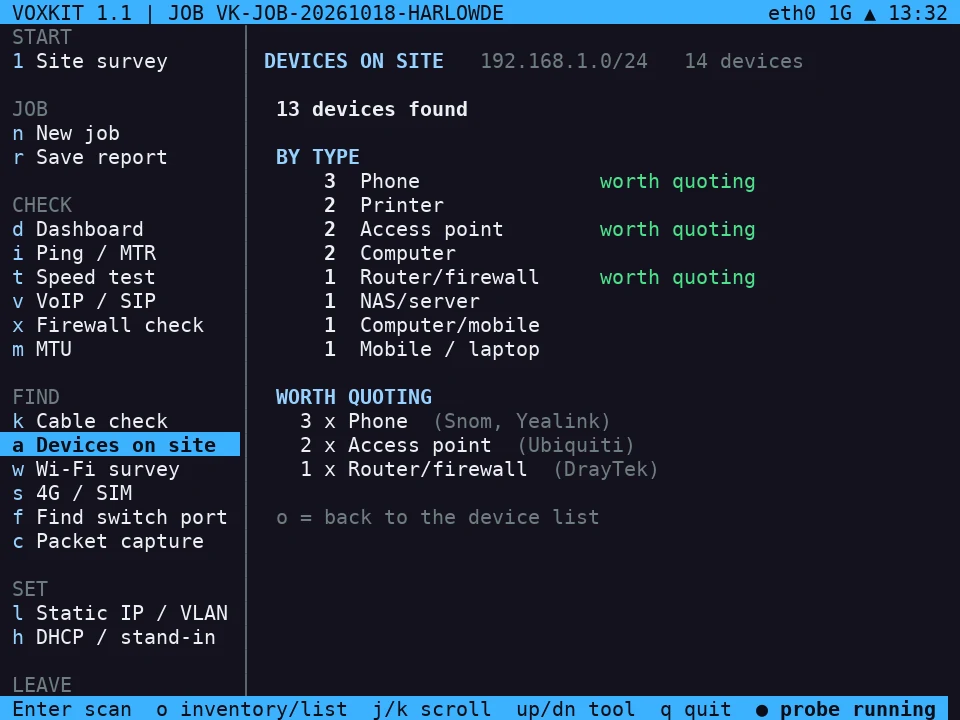
Devices on site

Every device by maker and type (phones, routers, Wi-Fi, printers), what you could quote to replace, and a warning if a second device is handing out addresses.

w
Wi-Fi survey and join

Networks, channels and signal, tagged room by room. Join the customer's Wi-Fi once and it rejoins on the next visit.

s
4G / SIM

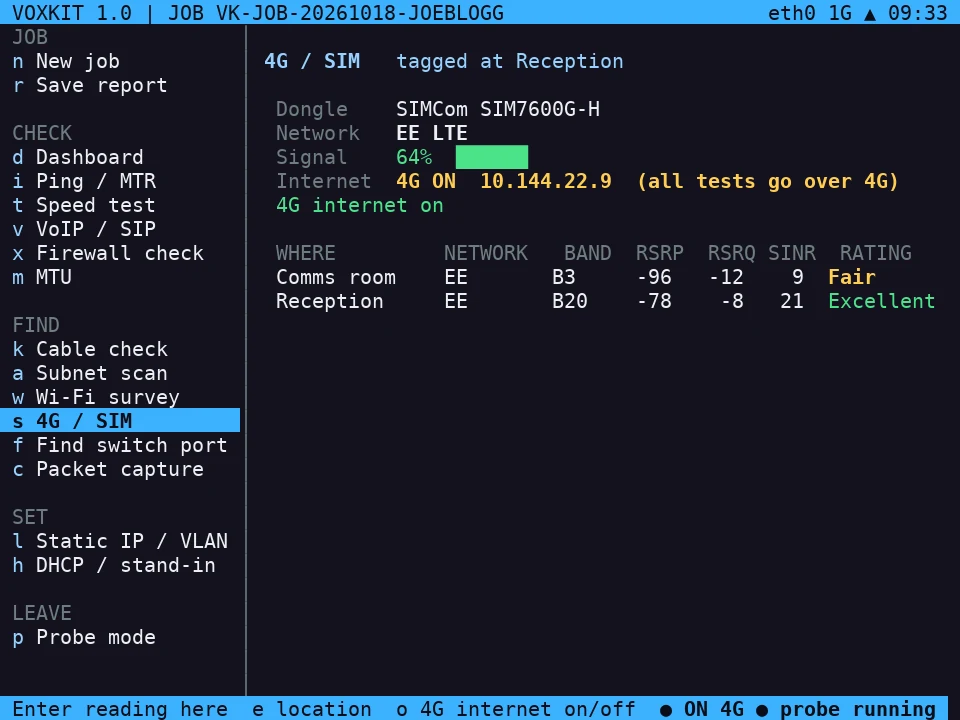
Signal strength and quality where the backup router will sit, rated Excellent to Poor. Can also give the unit its own internet.

f
Find switch port

Switch, port and VLAN read from the switch, or the port light blinked so you can spot it.

c
Packet capture

A standard capture file for Wireshark, for escalations to carriers and manufacturers.

Set

Stand in for equipment.

l
Static IP and VLAN

Test the network as a phone on the voice VLAN will see it, before any phones arrive.

h
DHCP and stand-in router

Set up kit on the bench, or take over a dead router's address and run the office over 4G until the line is fixed.

Leave

Watch a site for days.

p
Probe mode

Tests every five minutes, survives power cuts, emails alerts and a daily summary, and finds the slow periods for you.

New in Voxkit 1.1

A real test call, every unit live, and a survey mode for sales.

Test call · key v then o

No more “we’ll confirm with a test call”.

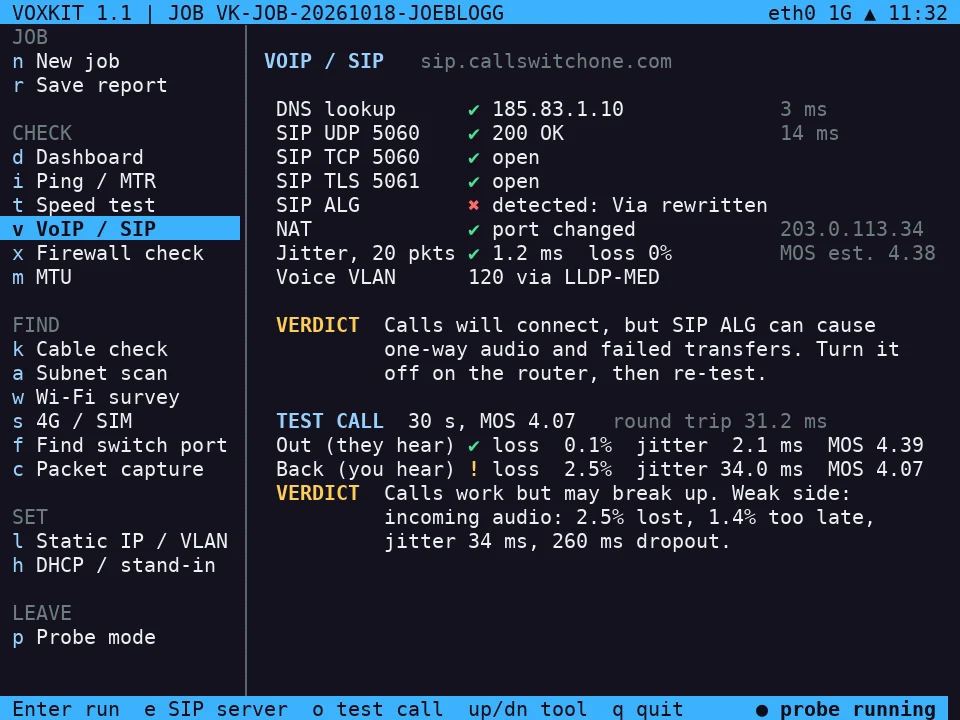
The unit and your Voxkit server send each other 30 seconds of voice-sized audio at once, like a real call. You get packet loss, jitter and a call-quality score for each direction, and one-way audio is caught outright: if sound gets out but nothing comes back, the router is blocking the return audio.

Test call result: outgoing audio good, incoming audio fair with 2.5% loss and 34 ms jitter
Sample: outgoing clear, incoming breaking up. The verdict says which side is weak.
Live dashboard

Every unit, live, from your desk or phone.

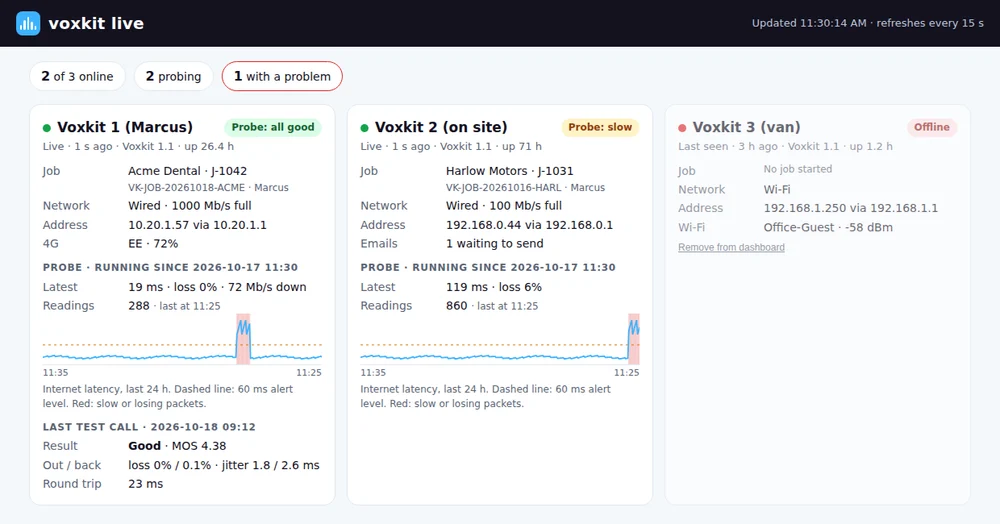
Units on site or out with your team report in every 30 seconds to a private, password-protected dashboard: online or not, which job, how it’s connected, the probe’s 24-hour latency graph, sites with a problem right now, and the last test call. Status only: no passwords or Wi-Fi keys ever leave the unit.

Live dashboard with three units, one flagged slow, each with a latency graph
Sample: three units, one site flagged slow.
Site survey · key 1

Sales can survey the site before you book the job.

Plug in, press Enter, type the customer’s name and confirm they’re happy. In a couple of minutes it checks the internet, speed and Wi-Fi, lists every device on site by maker and type, and emails one report. The engineer arrives knowing the site, and you can quote replacement phones and Wi-Fi from what’s already there.

Devices on site: 13 devices, 3 phones, 2 access points and a router worth quoting
Sample inventory: 13 devices, with the kit worth quoting picked out.
Reports

The report is done before you're back in the van.

Engineers never type test results. They start the job, test as they work, and save. Voxkit emails the job file with a summary as soon as it's online, and it becomes a branded PDF for the customer.

  1. Start the jobCustomer, site code and job ref.
  2. Plug inAny socket. The dashboard shows the network straight away.
  3. Test as you workFirewall, speed, phones, Wi-Fi, sockets. Each result saves itself.
  4. Press saveOffline? It queues and sends when it's back online.
  5. Customer PDFYour logo, plain-English findings, recommendations and sign-off.
From: Voxkit · SubjectVoxkit report VK-JOB-20261018-JOEBLOGG - Joe Bloggs Ltd
Customer:  Joe Bloggs Ltd  (JOEBLOGG)
Job ref:   JOB-48261
Visit:     Install
Engineer:  Marcus Kimber

Speed:     468 down / 71 up Mb/s, 9 ms
Phones:    reachable, SIP ALG Detected
Firewall:  Phones will NOT work properly until IT makes the changes below.
4G:        Comms room Fair, Reception Excellent
Flag:      [medium] SIP ALG is on at the router

The report file is attached.

What goes in the customer report

  • A clear status: Healthy, Issues found, Action needed or Ready to go live
  • Internet connection, local network, VLANs, switches and a socket-to-port map
  • Speed, call quality, the firewall check and Wi-Fi and 4G surveys
  • Monitoring charts with slow periods shaded, when probe mode was used
  • Issues and recommendations in plain English, flagged automatically so nothing is missed
  • "Connecting your router" steps when the line isn't live yet

Wi-Fi passwords appear only when the engineer adds them. Router and firewall admin logins never do.

Probe mode · key p

Leave it on site. Check it from home.

Intermittent faults never happen while an engineer is there. Probe mode tests the router, the internet, DNS and the phone platform every five minutes and runs a speed test every hour, for as long as you need.

  • Alerts by email when the internet goes down or stays slow for 10 minutes, and again when it recovers
  • A daily summary at 08:00: typical delay, worst periods and any outages
  • Patterns found for you, like slow every weekday morning when the cloud backup runs
  • Live dashboard: every unit and its readings in your browser, refreshed every 15 seconds
  • Remote access over a private encrypted link: open the unit’s own live screen from your PC or phone, wherever it is
  • Keeps going through power cuts and restarts until you stop it
Probe mode: four days of results, slow every weekday 08:45 to 09:35, peak 158 ms
Sample: slow every weekday from 08:45, peak 158 ms. The fix was moving the cloud backup.
From: Voxkit · 09:52Recovered: Joe Bloggs Ltd
Joe Bloggs Ltd: the connection was slow (worst 158 ms) from 08:45 Tue 20 Oct to 09:35 Tue 20 Oct (about 50 minutes).
Now back to normal: 11 ms, 0% loss.
4G backup · key s

Measure the 4G where the backup router will actually sit.

Coverage maps describe the street, not the comms cupboard. With the 4G dongle fitted, walk to each spot, press Enter, and get a rating in ten seconds, averaged over several samples.

ExcellentGoodFairPoor
Strength RSRP≥ −80 dBm−90−100< −100
Quality SINR≥ 20 dB130< 0

The rating is the lower of the two, so a spot only scores Excellent when the signal is both strong and clean. Each reading also records the network, band and mast.

When the customer's line is dead

Stand-in router mode takes over the dead router's address, so every phone and PC carries on with no restarts, and runs the office's traffic over 4G until the line is fixed. It won't start while the old router is still answering.

4G readings: comms room Fair at minus 96 dBm, reception Excellent at minus 78 dBm
Sample: the comms room is only Fair; reception, ten metres away, is Excellent.
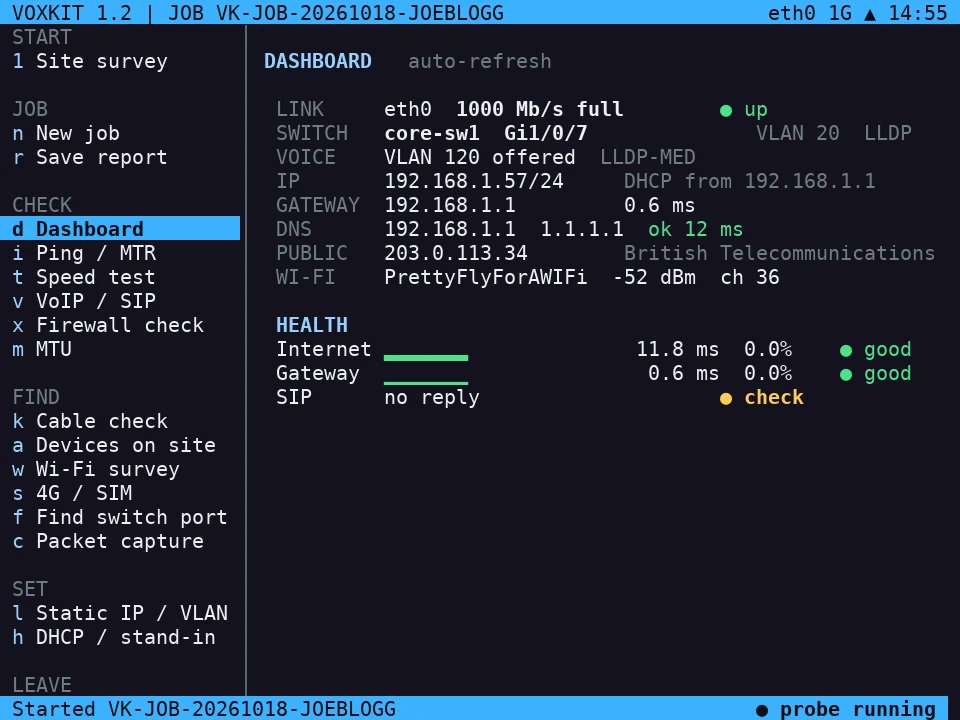
Stand-in router running as 192.168.1.1, internet shared from 4G, three devices listed
Stand-in router: the office back online over 4G, phones carrying on as before.
Safety and data

Safe to plug into a customer's live network.

Can't fight a router

DHCP and stand-in modes refuse to start while another device is handing out addresses on the cable.

Puts things back

Static IP, VLAN and hotspot settings are undone when you leave the tool or quit.

No passwords captured

Admin logins never go into a report. Saved customer Wi-Fi stays on the unit and can be forgotten with one key.

Light touch

Short, gentle tests, run one at a time so a speed test can't spoil a call-quality result.

Authorised use

Built for networks you're installing or supporting, with the customer's agreement.

Private remote access

An encrypted link that connects outwards. The customer opens no ports and changes nothing.

Hardware

A real computer that fits in a jacket pocket.

Full device details, controls and specifications →

ComputerRaspberry Pi 4
Screen3.5 inch colour display
KeyboardBuilt-in QWERTY with shortcut keys
Wired networkGigabit Ethernet
WirelessDual-band Wi-Fi (2.4 and 5 GHz), Bluetooth
4G (optional)SIMCom SIM7600G-H USB dongle with external antenna
PowerRechargeable battery, USB-C charging, runs while charging
Remote accessPrivate encrypted link to your PC and phone
Live dashboardEvery unit online, its job and probe readings, in a browser
Phone platforms

Firewall profiles for the platforms you install.

CallSwitch OneBuilt in
Gamma HorizonOn the roadmap
3CXOn the roadmap
Microsoft Teams PhoneOn the roadmap
RingCentralOn the roadmap

Each profile carries the platform's published domains, addresses and ports, and is updated when they change. Tell us which platform you need next.

Questions

Before you ask.

Does it replace a cable certifier?

No. The cable check proves a run carries data cleanly under load, which catches bad terminations, damaged leads and runs stuck at 100 Mb/s. It doesn't certify new structured cabling to a standard.

Can it prove call audio?

Yes, with a Voxkit server set up. The test call sends real voice-sized audio both ways at once and measures loss, jitter and call quality in each direction, and catches one-way audio. It proves the network carries call audio; the firewall check covers each phone platform’s own rules.

Can I see units remotely, live?

Yes, two ways. The live dashboard shows every unit and its readings in a browser, refreshed every 15 seconds. And over a private encrypted link you can open a unit’s own screen from your PC or phone and use it as if you were holding it.

Could it disrupt the customer's network?

Its tests are short and light, and the modes that hand out addresses refuse to start while another device already does. Settings it changes are undone when you leave the tool.

Does it need the customer's internet to send reports?

No. Reports queue on the unit and send as soon as it has any connection: the customer's network, Wi-Fi you join, your phone's hotspot or the optional 4G dongle.

What happens to customer data?

Results stay on the unit and in the reports you send. Router and firewall admin logins are never recorded, and saved Wi-Fi networks can be forgotten at any time.

Can the reports carry my company's branding?

Yes. Report numbering, company name and contact details are settings, and reports use your logo and colours.

When can I get one?

Voxkit is in field trials now. Register interest below for early access.

Early access

Register interest.

Tell us your company, how many engineers you have, and which phone platforms you install. We'll be in touch about early units and founding-partner pricing.

Email us to register
hello@voxkit.tech